The manual for 0.5.5. Thirteen pages, in the order you meet the tool: the window, a first check, the job in one screen, one page for each of the six tools and one for who supplies what, the machine you have not set up yet, and last, working with an AI agent and checking what it tells you.
READS every file·WRITES only when you approve a plan·SENDS nothing you did not ask for
01 The window
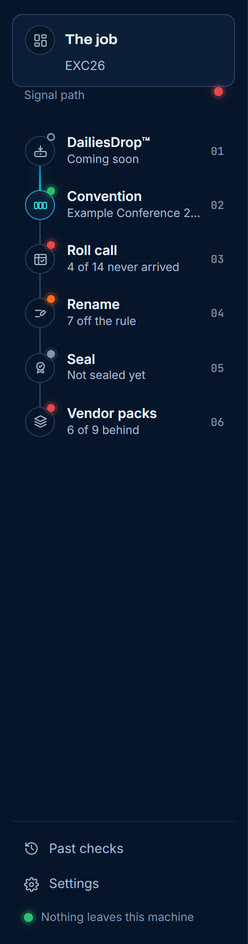
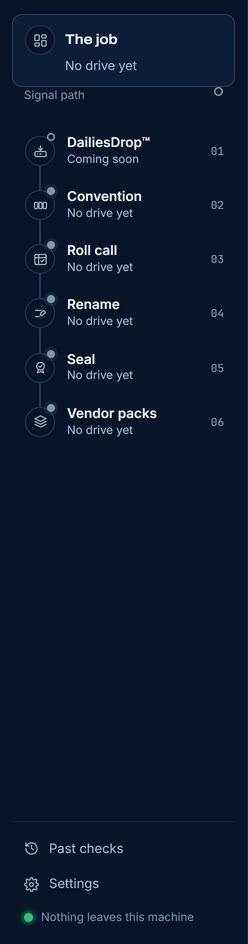
Three parts, and each has one job. A bar across the top for the drive, a signal path down the left for the six tools, and the stage, which is whichever tool you are in. Nothing in this window does another part's work.
The barthe drive, the rule, and what needs you
One line, always there. Which drive, which rule it is held to, Check again, and the one figure that is about you rather than the media: how many things need a person.
The signal path
The six tools in the order the work goes in, each with a lamp and the one thing that matters about it now. It is lit as far as the job has got without a problem, so the first red lamp is the next thing to deal with.
The bar
The drive and the rule. It does not change when you change tools, because what is being read does not change when you change tools.
The signal path
Six tools, in pipeline order. Green is settled, amber is working or worth a look, blue is on the wire, red is stopped, and a hollow lamp means nothing yet. A tool that does not apply to this job, such as DailiesDrop, which is coming soon, is passed through rather than breaking the path.
The stage
Whichever tool is selected, and the only part of the window that changes. Each tool draws its own instrument here rather than filling a shared console with different words.
02 Your first check
From a machine with nothing set up on it. About two minutes, and nothing on your drive is touched: checking only ever reads.
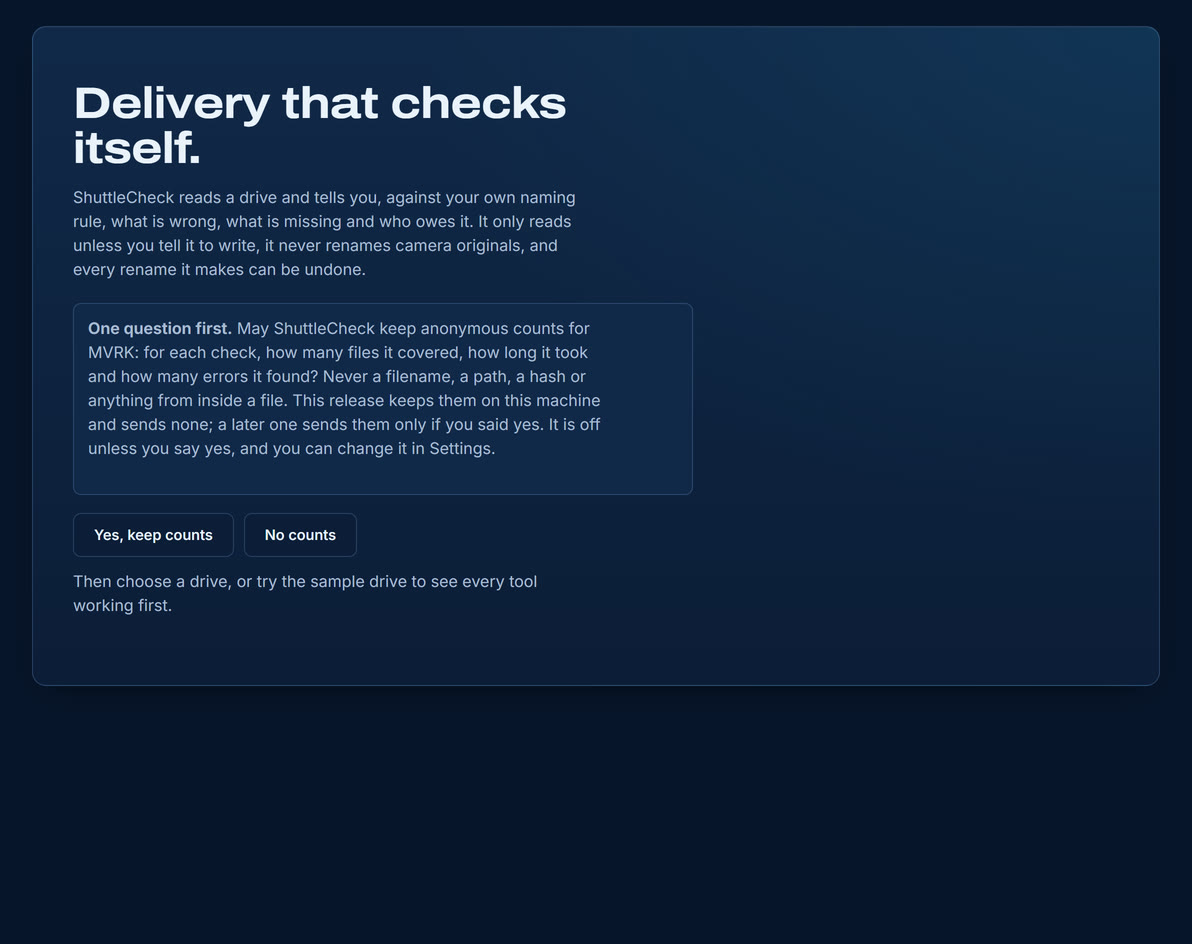
One question firstthe very first launch
What it does and does not do, said once, then the only question it asks before you start. It is off unless you say yes.
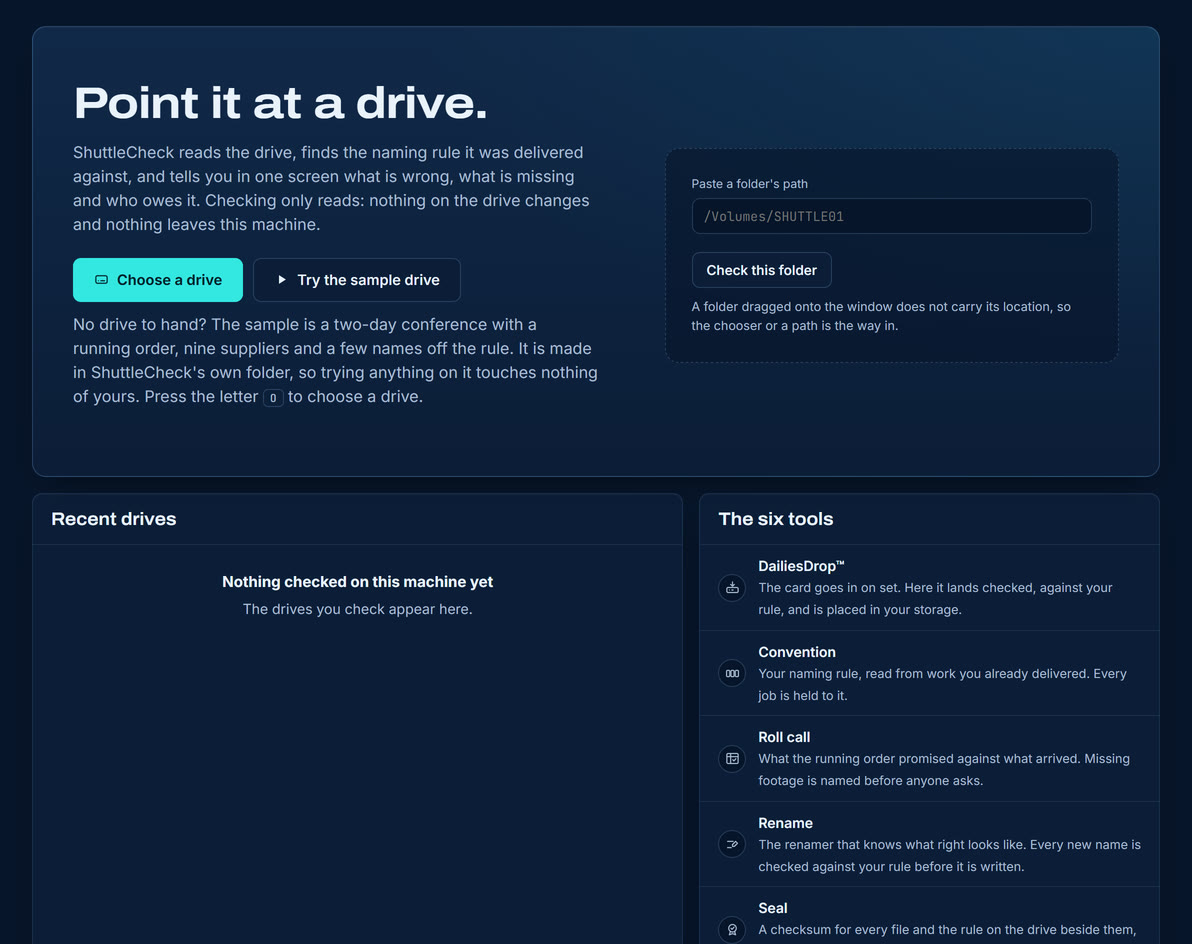
Point it at a driveno drive chosen yet
Choose a drive, paste a path, or try the sample drive. The six tools are described underneath, so you can see what this is before you give it anything.
Point it at a drive. Press Choose a drive, or paste a folder's path and press Check this folder.
It reads, and nothing else. No file moves, no file is renamed, nothing is written.
Read the first line. The job opens with a sentence, not a dashboard: what will fail, and who owes what.
Follow the path. The first red lamp on the left is the next thing to look at.
03 The job
All six tools in one screen. It opens with the story, because a figure you have to interpret is slower than a line you can act on.
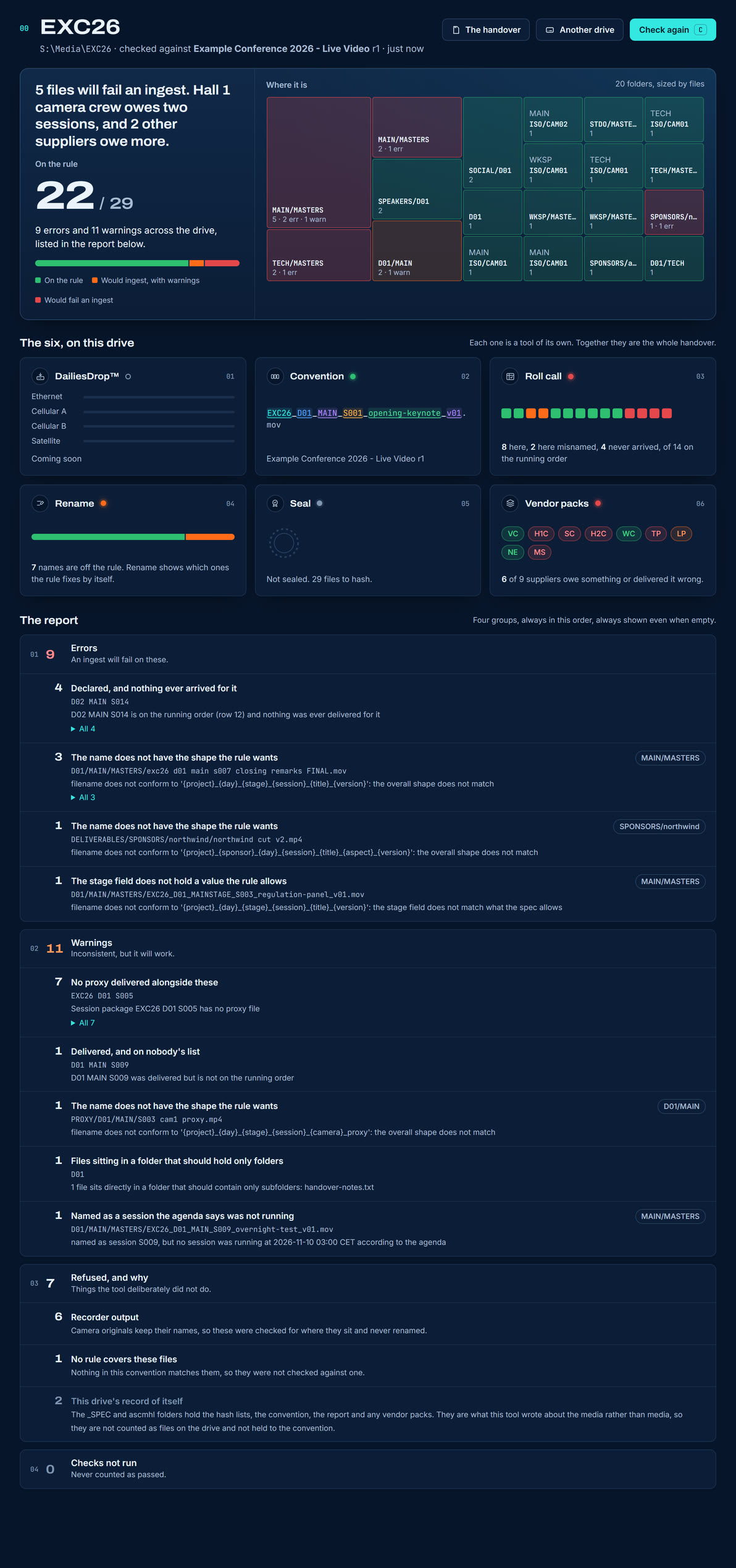
The whole jobEXC26 · 29 files · 9 errors
Reading down: the story, the ratio, the drive as a map of its folders, one card per tool, and the report in its four groups.
The story first
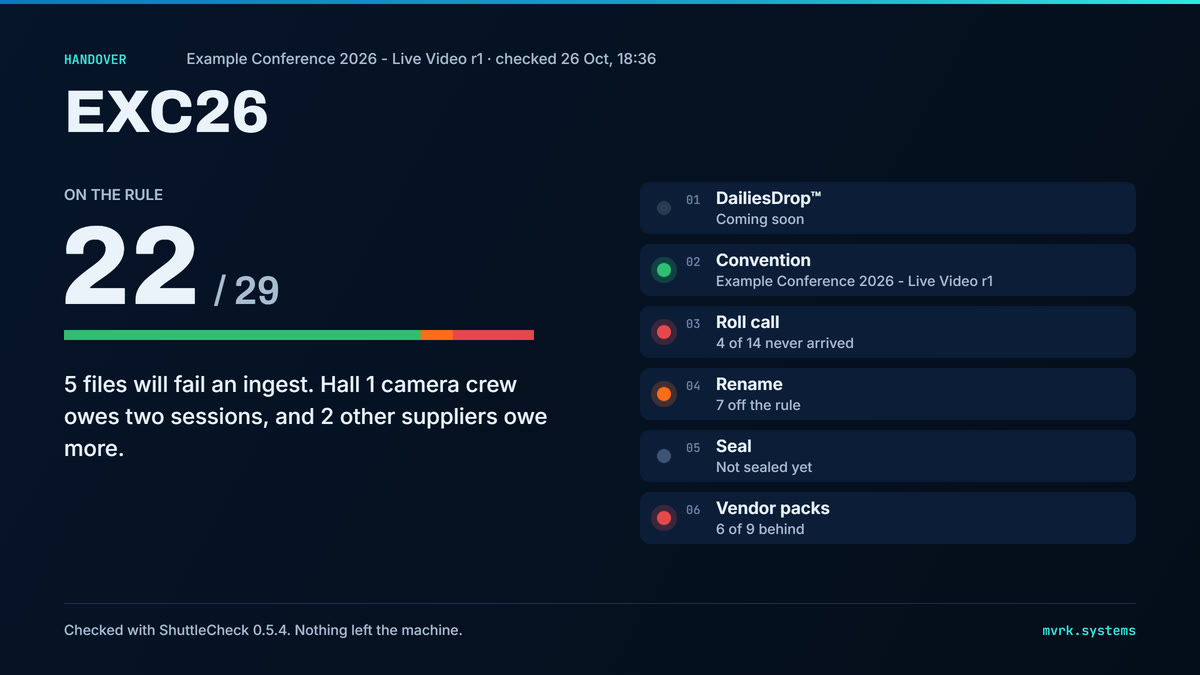
One sentence naming what will fail and who owes what: 5 files will fail an ingest. Hall 1 camera crew owes two sessions. It is the answer to the question somebody actually walked over to ask.
The ratio second
How much of the drive is on the rule, as a figure and a bar. Errors and warnings are counted separately, because an ingest refuses one and accepts the other.
Where it is
Every folder on the drive, sized by how many files it holds and coloured by how they went, so a problem concentrated in one folder looks like one problem.
The six, on this drive
A small version of each tool's own instrument, so the state of all six is one glance rather than six clicks.
The report
Four groups, always in this order and always shown: errors, warnings, what the tool refused to do and why, and checks that could not run. Each problem is written once with how many files share it, because six files failing one thing is one problem, not six.
The handoverone picture for the chat or the email
The handover, at the top of the job, draws the drive as one picture sized for a chat or an email: the ratio, the six lamps and the one sentence. Copy it, save it, or copy it as plain text. It carries nothing that is not true of this drive as of the last check.
04 DailiesDrop
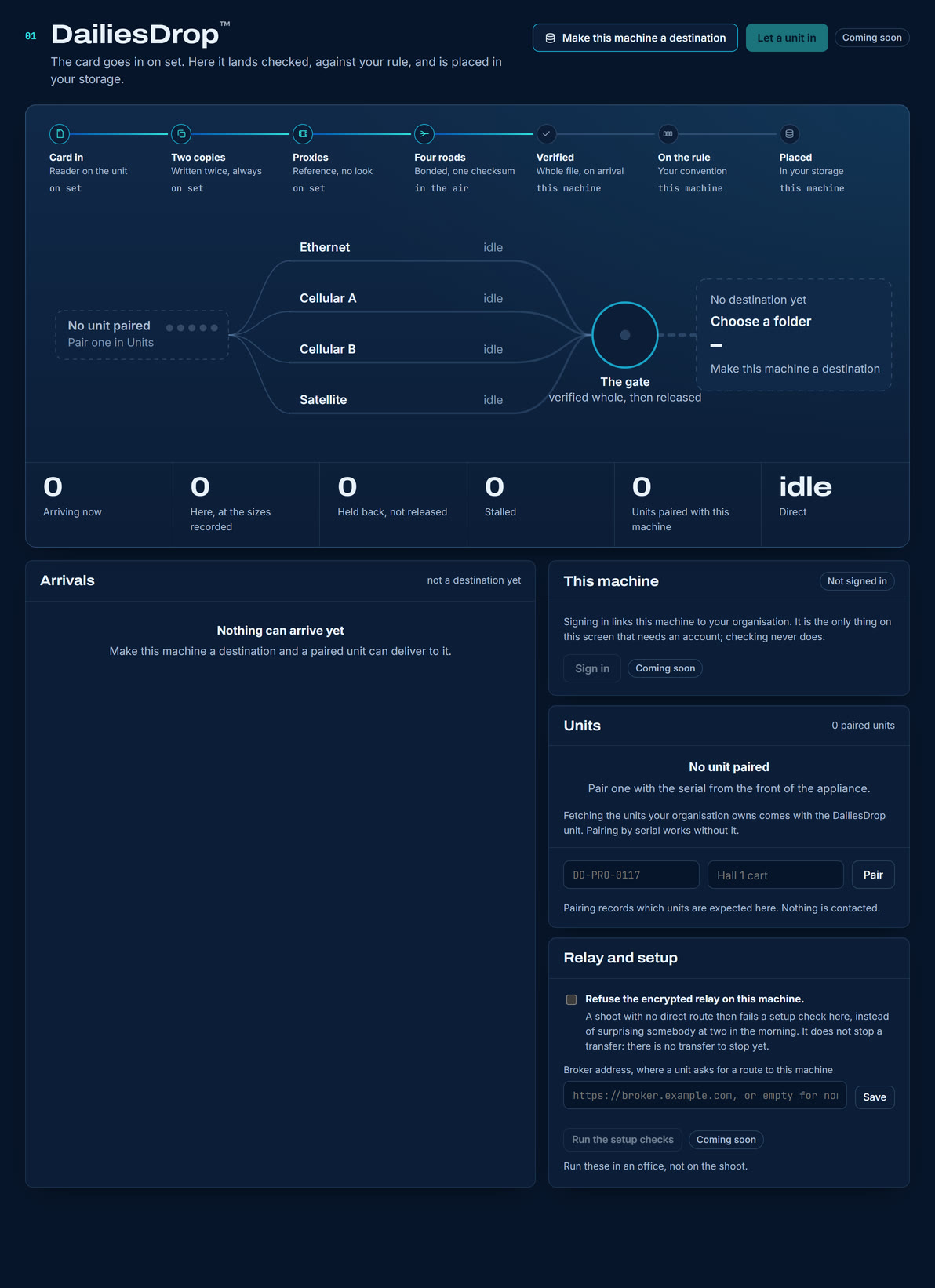
Where footage will come in from a unit in the field: the card goes in on set and lands here checked against your rule, verified whole, and placed in your storage. The unit is not out yet, so the dashboard is here and the controls that need it are marked Coming soon.
Units, roads, the gate and your storagedrawn live
Across the top, the seven stages from card to storage and where each happens. Under it, the four roads, the gate and your storage. A road moves only while bytes move on it, and its width is its share. Nothing is moving: no unit has been made to send.
Coming soonWITH THE UNIT
Let a unit in, Sign in, Enrol, fetching your organisation's units and Run the setup checks. These are the controls that would open a port for a unit or reach a service, so until the unit is out nothing listens and nothing is contacted.
Works nowON THIS MACHINE ONLY
Pairing a unit by the serial on the front of the appliance, which records which units are expected here and contacts nothing; refusing the encrypted relay; and the broker address. Each is a declaration kept on this machine.
05 The convention
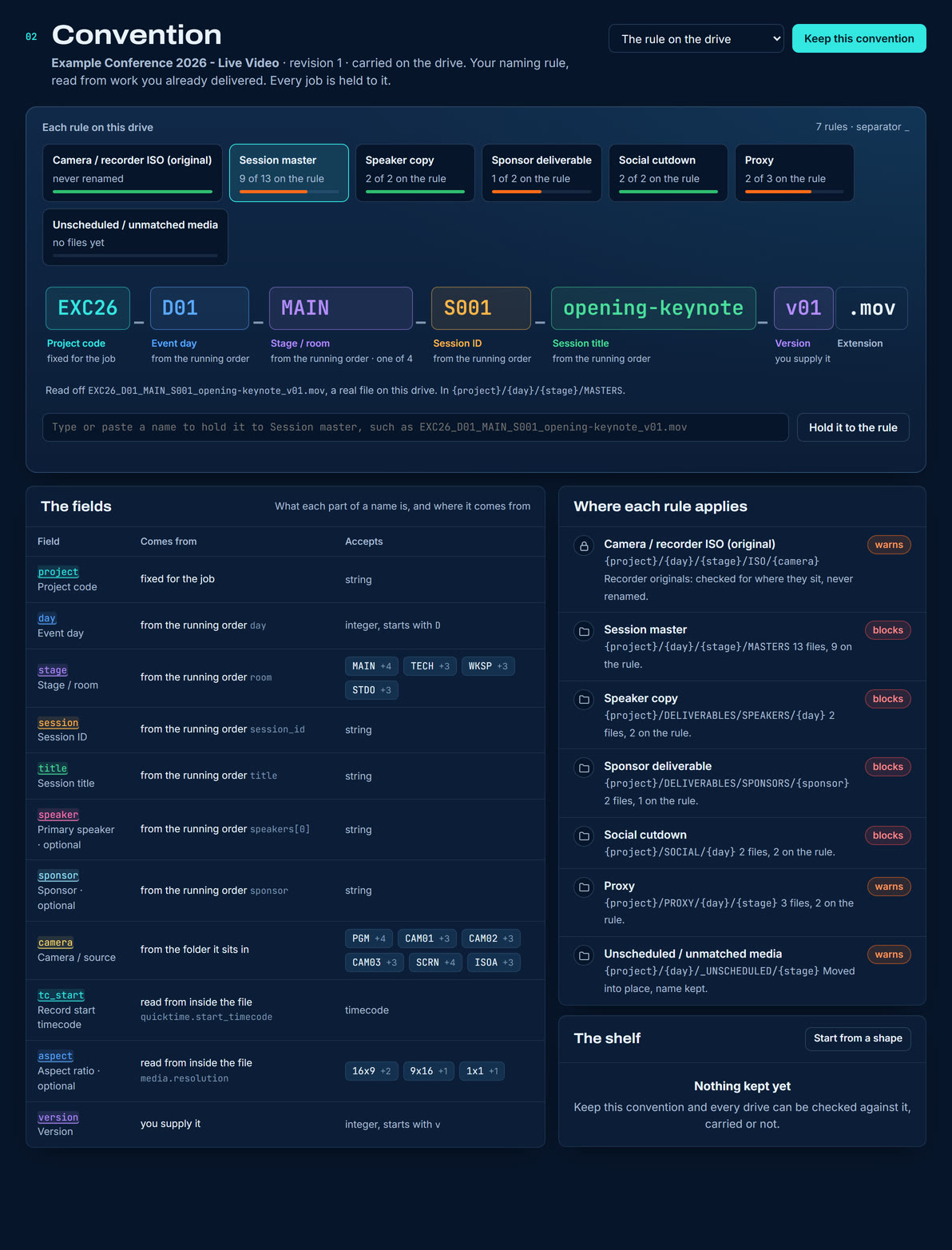
The rule the job is held to, read from work you already delivered so nobody writes YAML. A convention is a filename taken apart into the fields it is made of, and a statement of what each field is allowed to be.
One real filename, broken into its fieldswith a live tester under it
Each rule on the drive is a tab with how much of the drive is on it. The name is a real one off this drive, not an example, and each field says where its value comes from: fixed for the job, the running order, the folder, inside the file, or you.
The testera wrong name, explained
Type or paste a name and it is held to the rule as you type. A wrong field is outlined where it sits in the name, with what the rule takes there and the value that was probably meant. Use MAIN puts it in and tests again.
On the drive
A folder with a _SPEC convention in it carries its own rule, and ShuttleCheck uses it without being asked.
On this machine
Keep this convention files the drive's rule on this machine, with everything it carries: its suppliers, its contexts, its running order. From then on every drive can be checked against it, carried or not, and the choice at the top switches between them.
06 The roll call
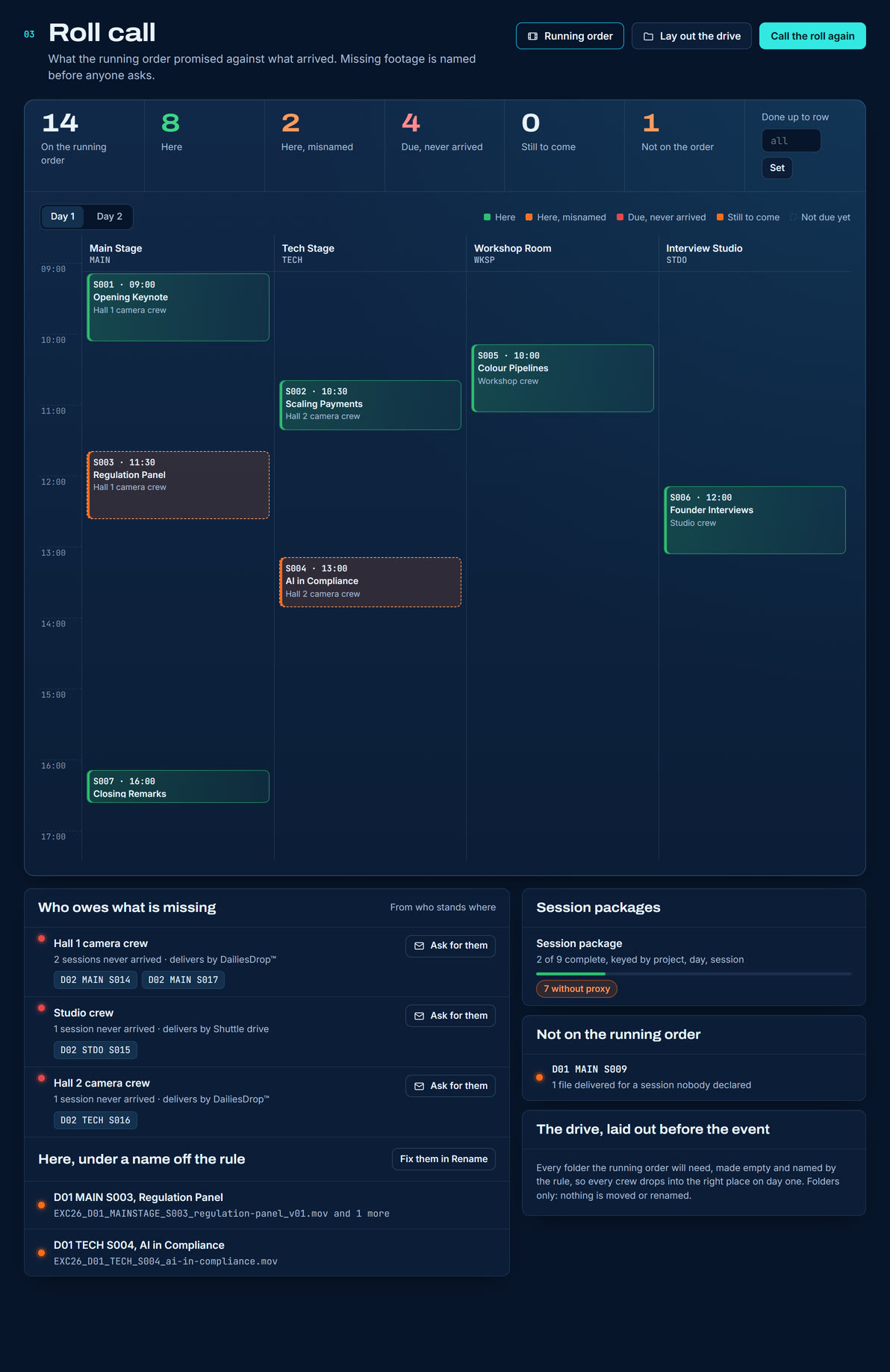
What the running order promised against what arrived. It is the only tool here that can tell you about a file that is not there, which is the only kind of problem a folder cannot show you by itself.
The running order as a boardstages across, the day down
Green is here. Dashed amber is here under a name off the rule, which Rename can fix. Striped red is due and never arrived. Under the board every crew that owes something is named, with the sessions they owe and Ask for them: the request to their address in Who supplies what, ready to edit, then Open in your email program, named on the button, or Copy message for webmail. ShuttleCheck sends nothing. The roll call remembers who was asked, when and about which sessions, and an AI agent can find the same request and record that it sent it.
Here
Something arrived for this session, named by the rule.
Here, misnamed
A file on the drive names this session as a whole word (MAINSTAGE_S003 names S003), but not in the shape the rule wants. It is not missing, and nobody is chased for it. A file named only by its title, such as Investor Panel MASTER.mov, says nothing about which session it is, so that session is still reported missing.
Due, never arrived
The job has gone past it and nothing came. The expensive one, and the only one that names a supplier.
Still to come
A session later than Done up to row. Nothing is wrong yet. Leave the box at all and every row is due.
Not on the order
Delivered for a session nobody declared: usually a typo in one place or the other.
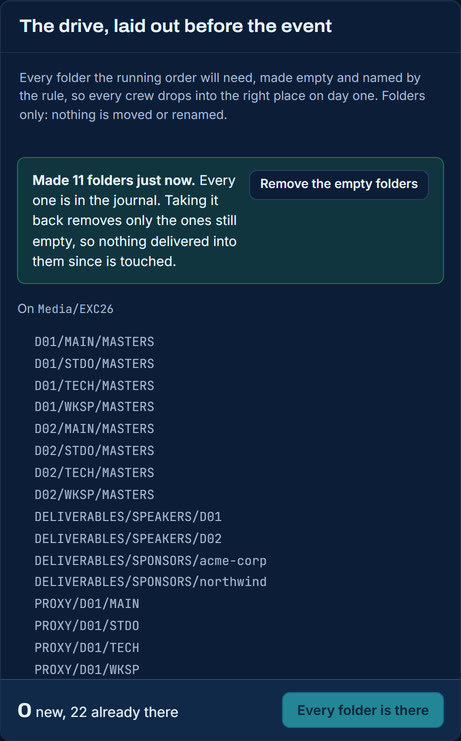
Lay out the driveand take it back
Before the event, the same board writes the folder tree the running order will need, empty and named by the rule. Folders only. Every layout is in the journal, and Remove the empty folders takes it back without touching any folder that has had something delivered into it since.
07 Who supplies what
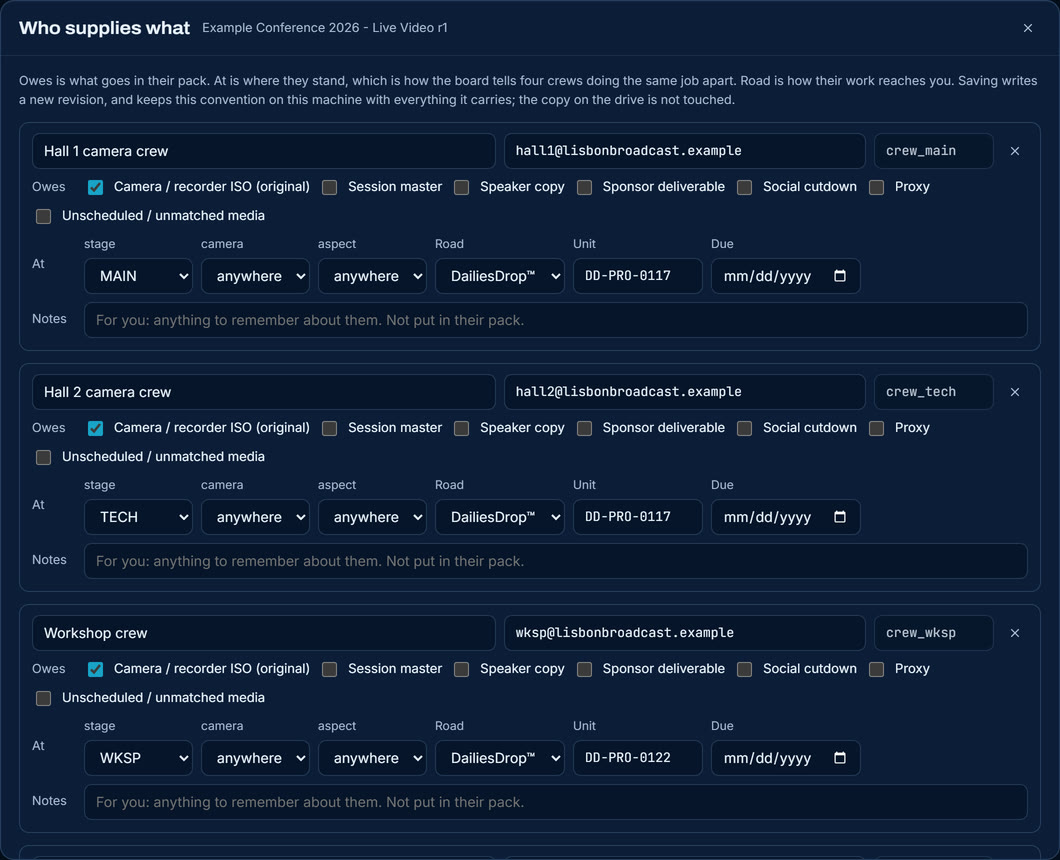
Every supplier on the job, what they owe, where they stand and how their work reaches you. It opens from Who supplies what on Vendor packs, and it is the page to read twice, because two of its settings look alike and do different jobs.
Four crews, one kind of worktold apart by where they stand
Name and email first, then the two settings, then the road. All four crews owe the same thing, so nothing in what they make tells them apart. Where they stand does: MAIN, TECH, WKSP, STDO.
OwesTHE TICKED BOXES
What goes in their pack. Tick the kinds of work they are responsible for and their pack carries the rules for those, with none of the rest of the job in it.
AtTHE DROPDOWNS
What charges them. It is how two suppliers doing the same kind of work are told apart: not by what they make, but by where they were.
Road and unit
How their work reaches you: a DailiesDrop unit (with its serial), a shuttle drive, WeTransfer, Google Drive, Frame.io, Aspera and so on. Descriptive only, and drawn on Vendor packs.
Due, and the short code
When it is owed, and the short code the convention files them under. Leave the code blank and it is made from the name.
Notes
Anything to remember about them, for you. Notes are kept with the convention and are not put in their pack.
08 Renaming
The one tool that writes over somebody's work, and so the one that needs a licence. It never touches a file until you have read the list and pressed Apply, and every run can be undone.
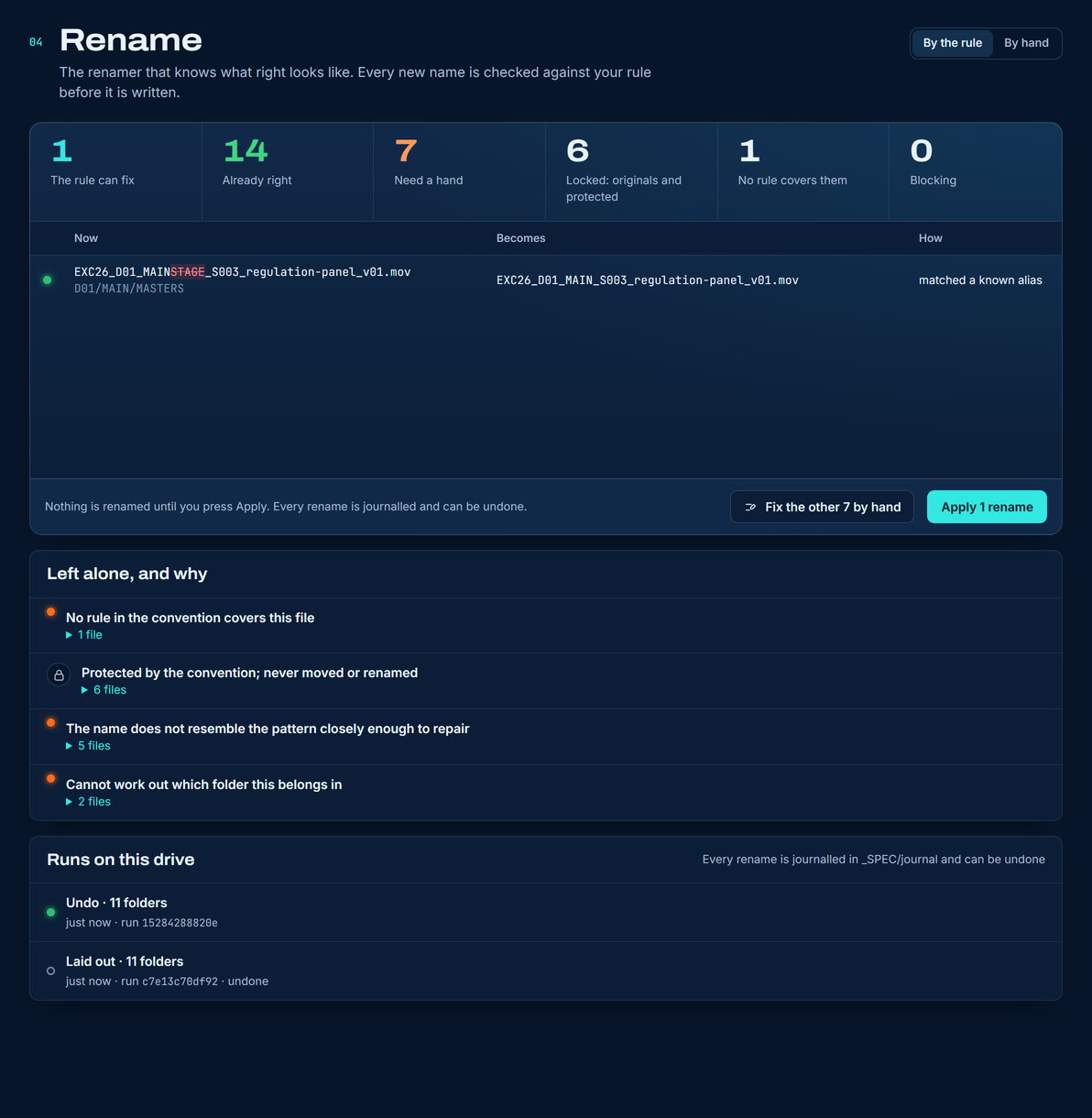
By the rulewhat the convention can fix by itself
The figures add up to every file on the drive. MAINSTAGE becomes MAIN because the convention lists that spelling. Below, everything left alone and why, and Fix the other 7 by hand opens the hand renamer with exactly those files.
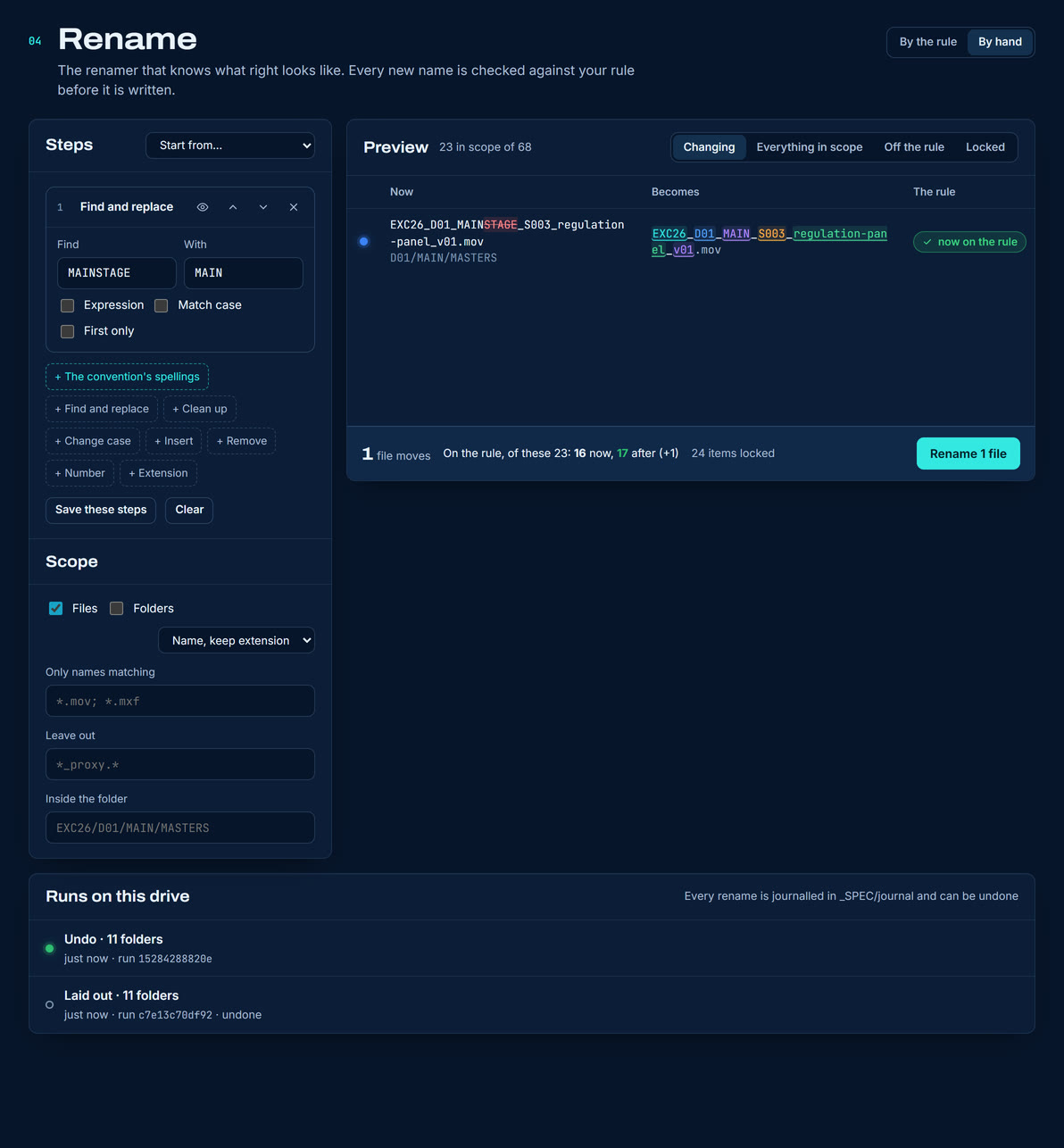
By handa stack of steps, every result held to the rule
Steps stack, and every result is held to the convention as you type. The footer counts how many names in scope are on the rule now and after. Underneath, every run on this drive, renames and layouts alike, each undone in one press.
Everything a bulk renamer doesFREE TO PREVIEW
Find and replace with regular expressions, case conversion, insert, remove, numbering in natural order, clean-up, extension, include and exclude patterns, and presets.
The convention's spellingsNOTHING ELSE HAS THIS
A whole field written another way becomes the convention's spelling: Main Stage becomes MAIN. Only the spellings the convention lists.
Never camera negativeSTRUCTURAL
Recorder originals and protected paths are drawn locked. No step reaches them, and neither does a folder that holds them.
Never half a renameONE COLLISION STOPS IT
One collision, or one name a drive would refuse, blocks the whole plan rather than applying the part that works. A rename that would leave names still off the rule asks for a second press and says how many.
Applying itNEEDS A LICENCE
Previewing is free. Applying a plan, and undoing a run, are what a licence buys. Every run goes through the journal in _SPEC/journal.
09 Sealing a drive
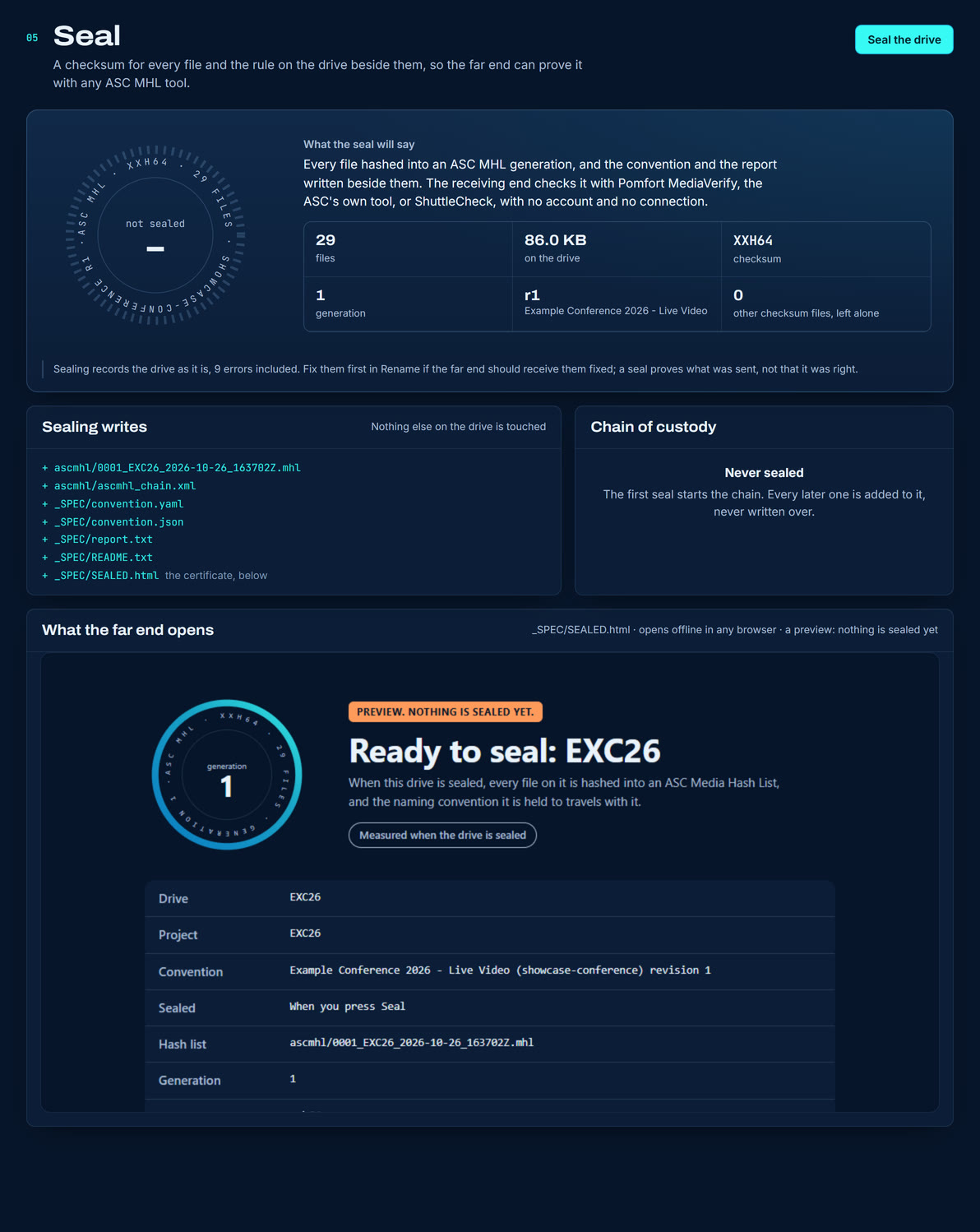
What you do before a drive leaves the building. It reads every file, writes a checksum for each one, and puts the rule and a certificate on the drive beside them. Your footage is read, never moved, renamed or rewritten. Sealing is free.
The seal, beforea stamp, what it writes, and what the far end opens
The ring carries the checksum, the count and the convention. Beside it, exactly what will be written, and under it the certificate the far end will open, marked as a preview because nothing is sealed yet.
Sealing the sample drive added seven files and changed none. The running order was already beside the convention, so it was left where it was:
EXC26/
  D01/ D02/ DELIVERABLES/ PROXY/ SOCIAL/   29 files, untouched
  _SPEC/agenda.csv
  _SPEC/spec.yaml
  ascmhl/0001_EXC26_2026-10-26_163708Z.mhl   NEW
  ascmhl/ascmhl_chain.xml                    NEW
  _SPEC/convention.yaml                      NEW
  _SPEC/convention.json                      NEW
  _SPEC/report.txt                           NEW
  _SPEC/README.txt                           NEW
  _SPEC/SEALED.html                          NEW
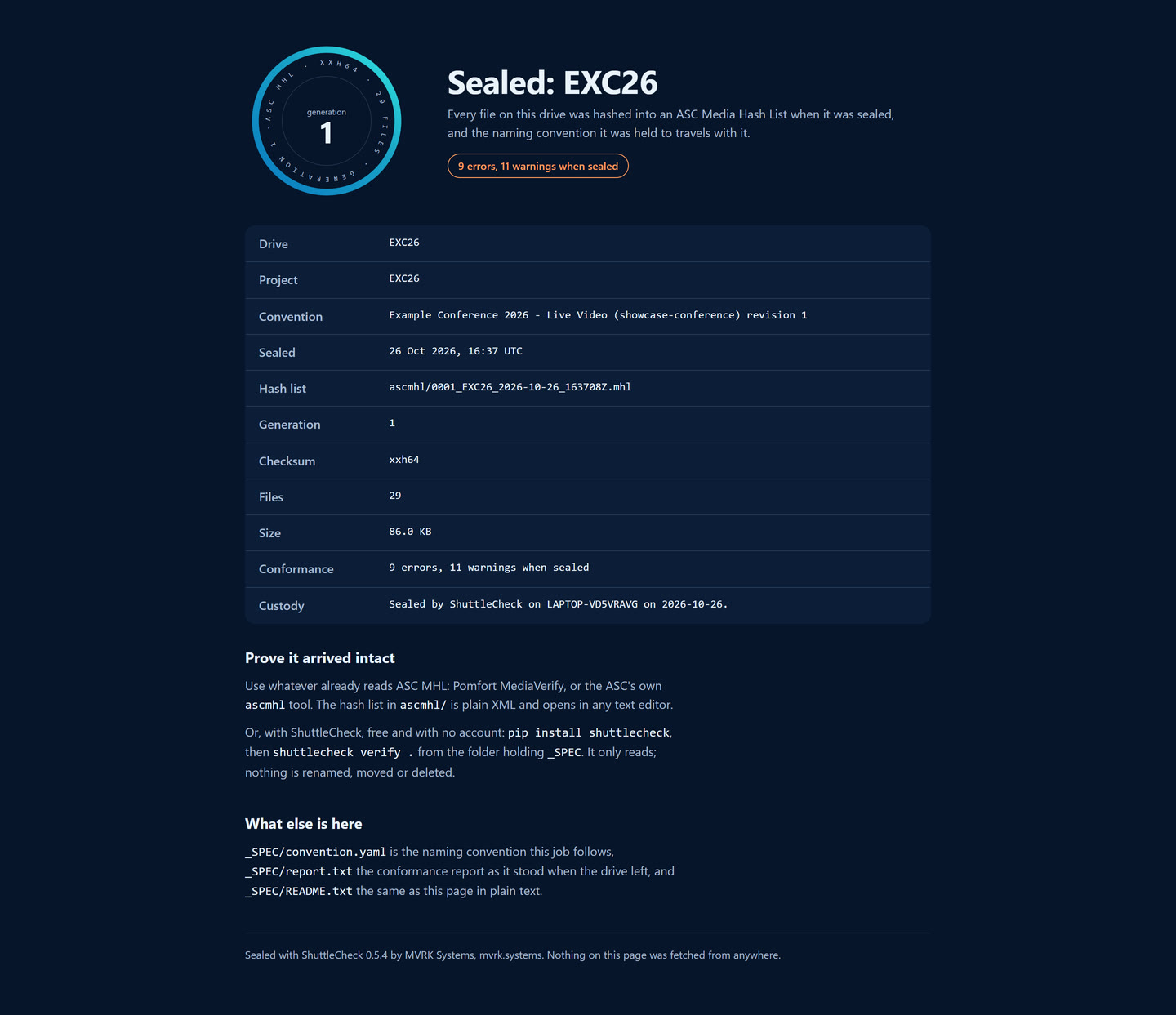
The certificate_SPEC/SEALED.html, as the far end opens it
The page a post house opens first. It works offline in any browser, says what was sealed, against which rule and in what state, and how to prove it arrived intact without installing anything of ours. Open the certificate on the Seal screen shows it.
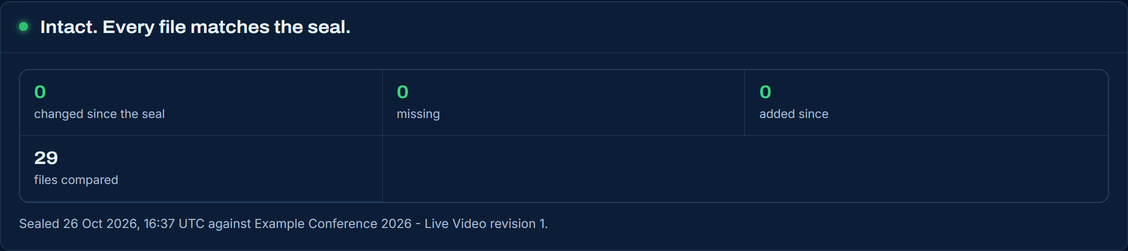
Verify against the sealat the far end, or before it leaves
Every file hashed again and compared: changed, missing and added, in the words the far end uses. Naming is a different question and is reported apart.
10 Vendor packs
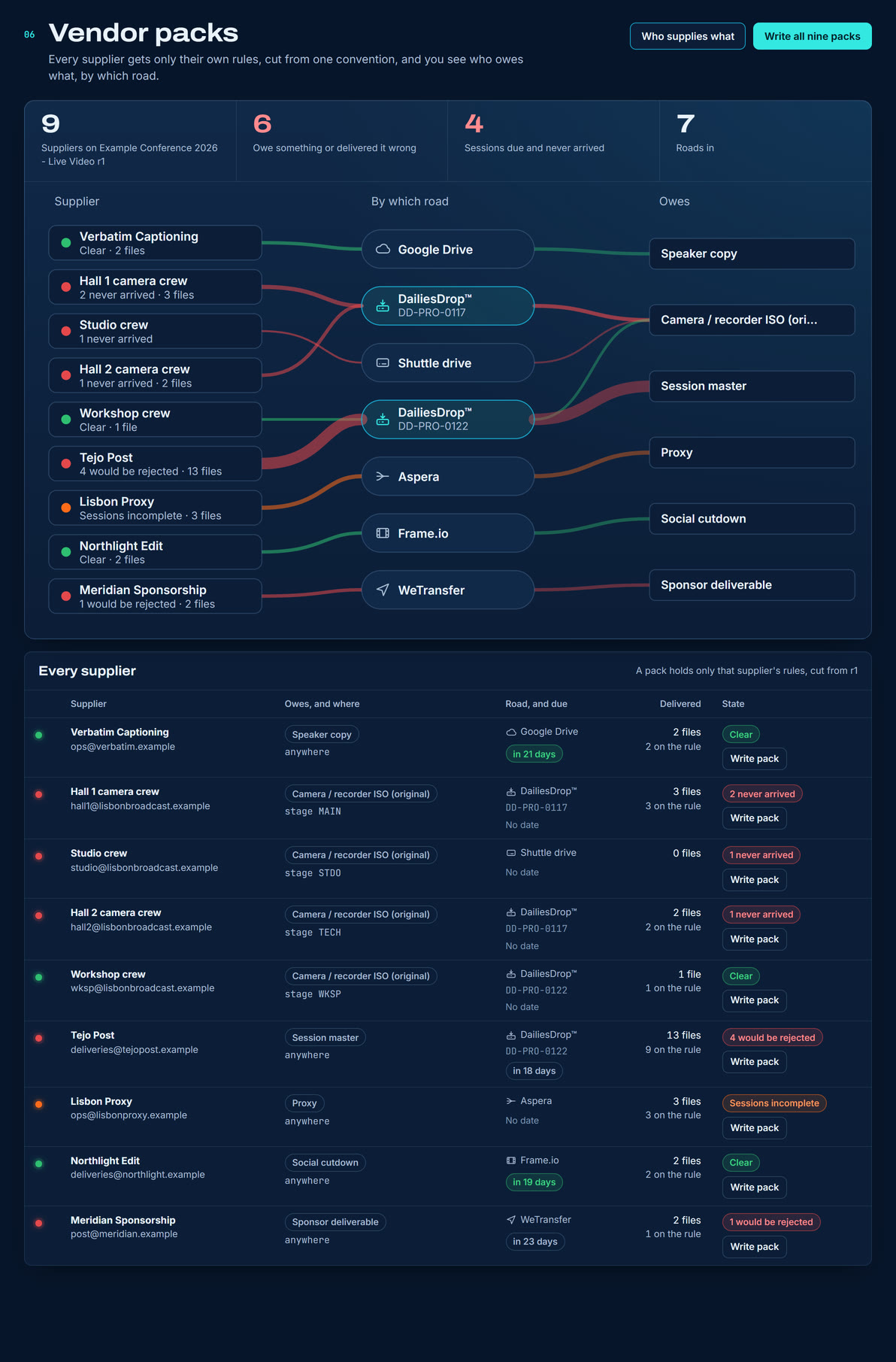
Each supplier gets only their own rules. Every pack is cut from the one convention and carries the contexts that supplier owns, with nothing else from the job in it.
Supplier, road, and what each oweson one picture
Each supplier, the road their work arrives by, and what they owe. A link is as wide as what was delivered and coloured by how it went. Two DailiesDrop units are two roads, and counted as two.
One rule in, many packs out
You write the convention once. Each pack is cut from it using what that supplier owes, so a captions house is handed the caption rules and never sees what the camera crews were asked for.
Write them all, or write one
Write all, which names how many, writes one per supplier into _SPEC/packs and accounts for every one: written, already there, or not written and why. A row's Write pack writes only its own, which is what you want when one house asks again a week after everybody else.
A pack already sent
Is never replaced without asking. Writing it again replaces it with one cut from the current revision.
This is the screen that answers the question a supplier actually asks, which is never what are the rules for this job but what are the rules for my part of it.
11 A machine with nothing on it
The first run, photographed on a computer that has never checked anything. Nothing here is greyed out and unexplained: every tool says the one thing it is waiting for, in words you can act on.
The bar, cold
No drive yet, and it says what to do about it.
The path, cold
Every tool says what it is waiting for. Check one drive, or the sample, and all six have what they need.
Two habits worth keeping. Verify the drive at the far end, because a seal is only worth what the other side checks. And run the roll call before anybody reformats anything.
12 Your AI agent
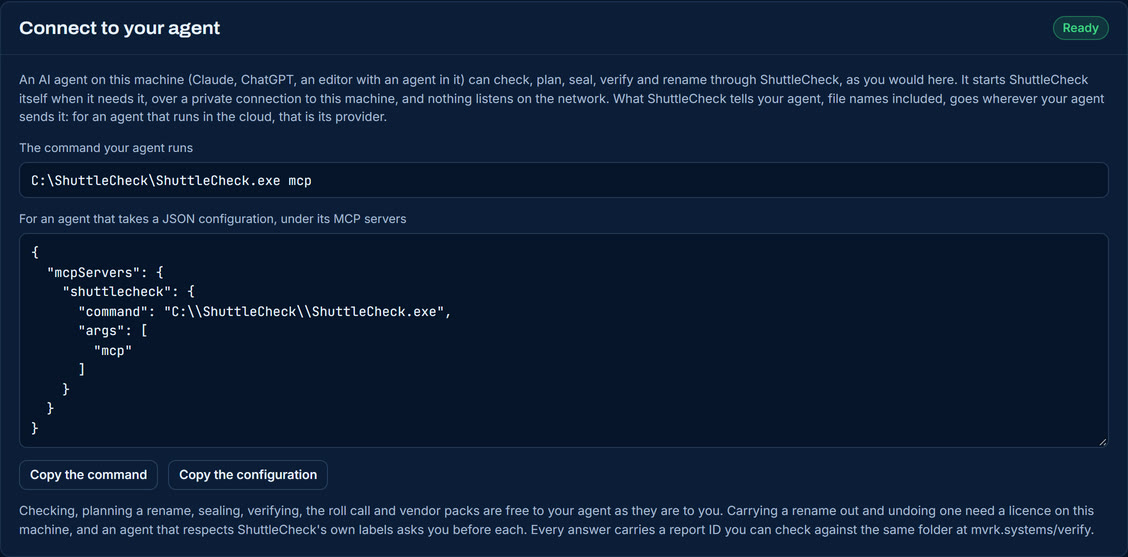
Claude, ChatGPT or an editor with an agent in it can use ShuttleCheck on your behalf: check a drive, plan a rename and show it to you, carry it out, undo it, seal a drive and verify one that arrived. You connect it once, in Settings. After that the agent starts ShuttleCheck itself, on this machine, whenever it needs it.
Settings, Connect to your agentthe command, and the same thing as configuration
The command is this install's own, with its full path, because the app you downloaded is not somewhere an agent would look for it. Copy the command, or Copy the configuration for an agent that takes one, into your agent's connector settings. Installed with pip instead, install the connector with it, pip install "shuttlecheck[agent]", and the command is simply shuttlecheck mcp.
The same, as text you can read and copy on any screen, for an app kept where these examples keep it. Settings shows yours, with its own path.
Windows
C:\ShuttleCheck\ShuttleCheck.exe mcp

macOS
/Applications/ShuttleCheck.app/Contents/MacOS/ShuttleCheck mcp

Installed with pip (pip install "shuttlecheck[agent]")
shuttlecheck mcp
What the agent can then ask for, and what each one does:
check            what is wrong with the names, and why
conform_plan     what a rename would move, before anything does
conform_apply    carry the rename out                 needs a licence
undo             put a rename back                    needs a licence
seal             write the hash list onto the drive
verify_seal      check a drive against its seal
vendor_pack      the rules one supplier needs
rollcall_build   what was declared, what arrived, whom to ask
record_asked     note that a supplier has been asked
13 Checking an answer
Every answer about a folder carries a report ID, such as SC-TR30-3C21-6P9S, and a link to mvrk.systems/verify. Open the link, point the page at the same folder, and it says whether this is the folder the answer was about, as it stands now.
The ID covers which files there are and under which rule: every path and its size, and the convention's id and revision. It is worked out on your machine, and again in the browser from the folder you point it at. Nothing is uploaded, and no list of reports is kept anywhere to look one up in. Sealing does not change it, because sealing writes only beside the media. A rename does. Undo the rename and the folder's ID comes back to what it was before, which is the plainest proof there is that every file went back where it came from.
From a terminal or a script, every command answers the same way an agent is answered. Add --json and it prints one object, with a stable code on every refusal. The commands that write take --dry-run and say what they would do. Every rename hands back the command that undoes it.